Marketing, IT, and Finance — Finally on the Same Page
Marketing buys the tools, IT supports them, finance pays for them — but nobody shares the same view. Give every department a shared architecture with change requests, approvals, and the audit trail that makes cross-functional decisions stick.
Sound familiar?
Cross-functional teams face unique challenges when managing a shared Martech stack.
Siloed decision-making
The problem
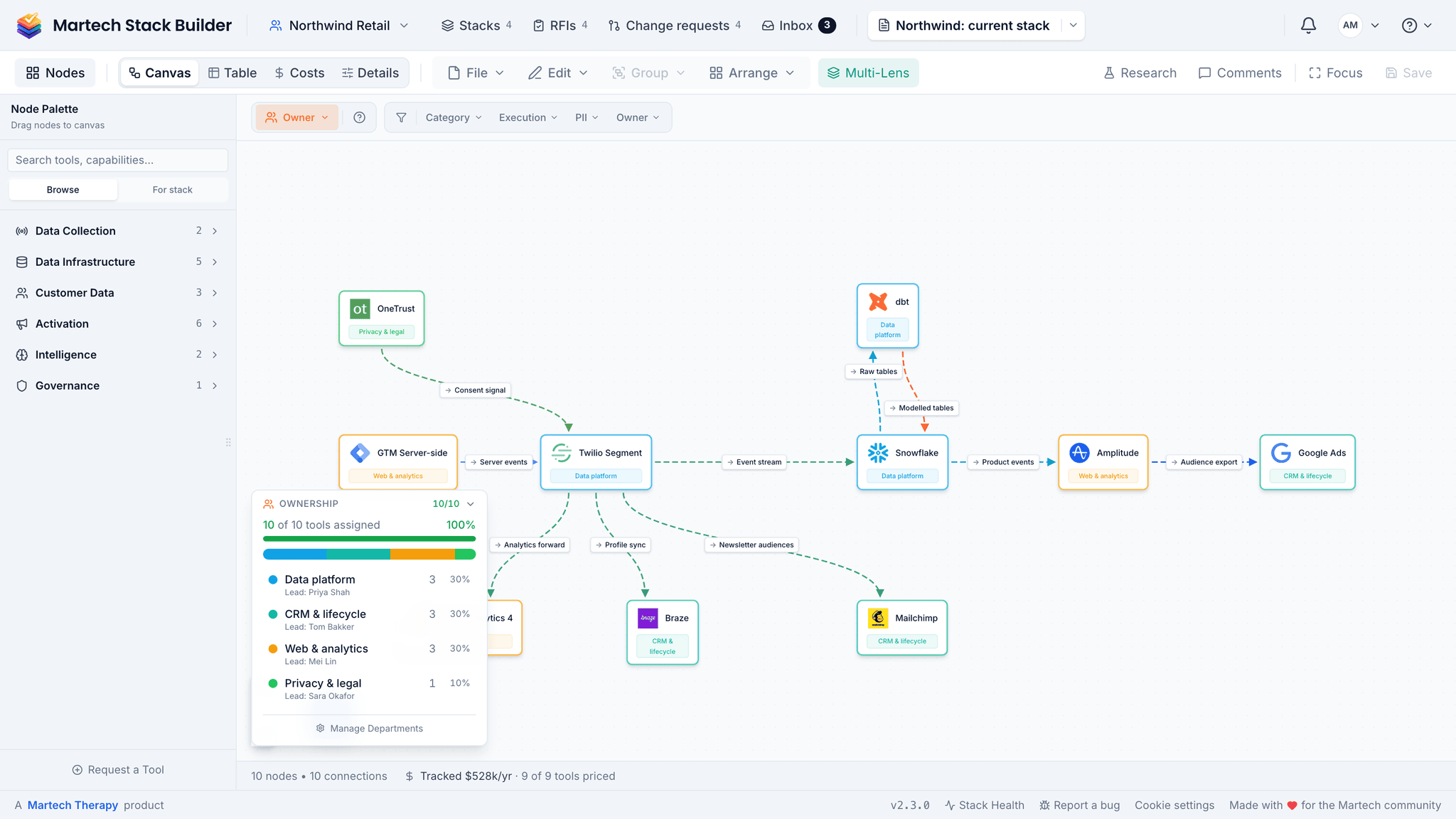
Marketing buys a new tool. IT doesn't know. Data team discovers it months later when integration breaks.
The solution
Team workspaces give everyone visibility. Department ownership shows who's responsible for what. No more surprises.
No change management process
The problem
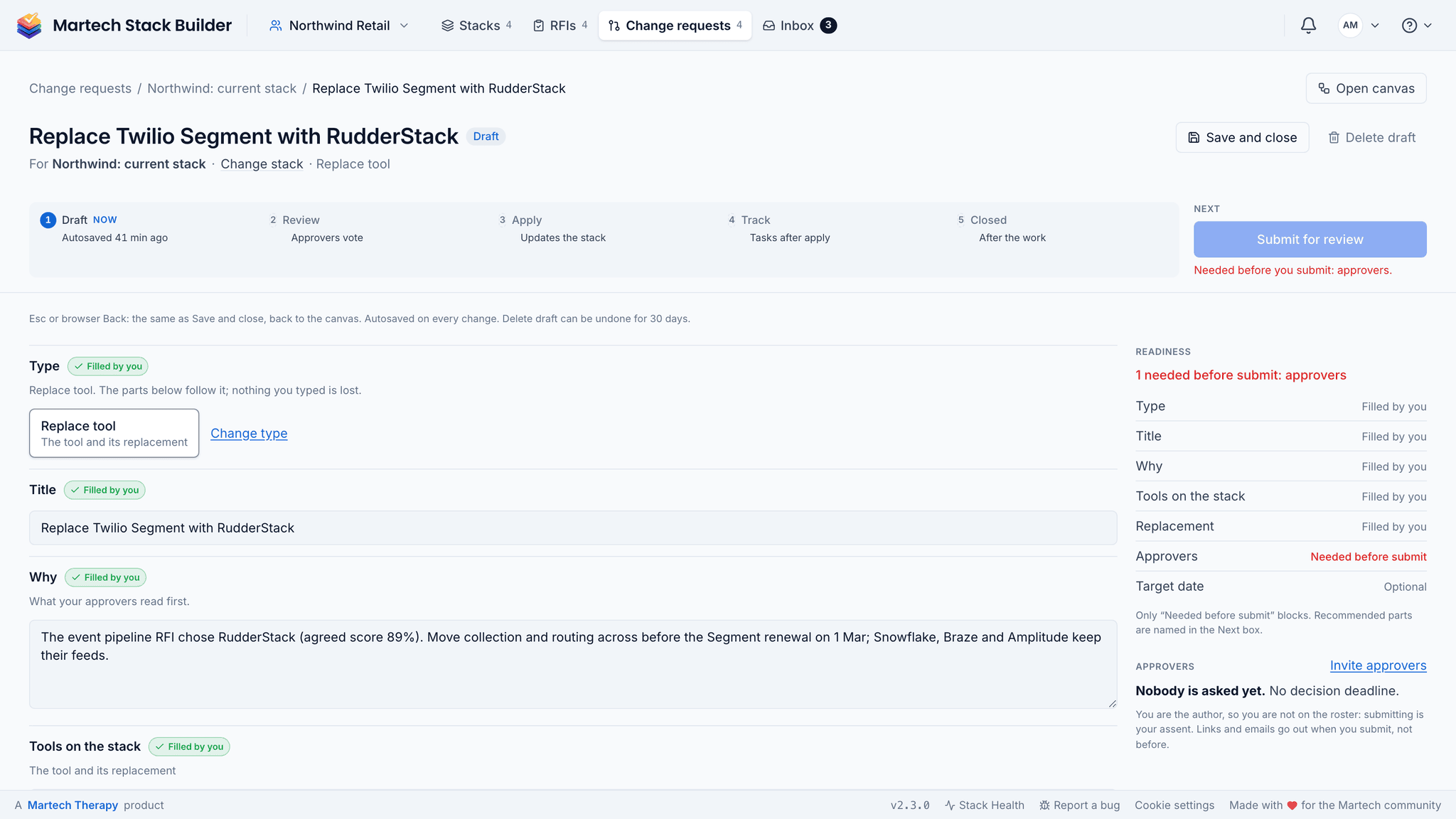
Someone swaps a vendor and things break downstream. There's no review, no approval, no record of why the change was made.
The solution
A change request goes from draft to review to the canvas, with tasks for the work afterwards and a closing record at the end. Approvers vote where they are, in the Inbox or on their phone.
No shared source of truth
The problem
The architect has one version in Lucidchart, the budget owner has another in a spreadsheet, and the exec has an outdated PowerPoint.
The solution
One interactive diagram that everyone references. Each save syncs to the cloud, so the team sees the current saved state of the stack.
Cross-team coordination is painful
The problem
Getting marketing, IT, data and finance aligned on a stack change takes endless meetings and email chains.
The solution
Each change request has its own discussion. Mention a colleague and it shows up in their Inbox, next to the decisions and tasks waiting on them, and in Slack if you connect it. And decisions get made in writing instead of in another meeting.

Built for team collaboration
Every feature is designed to help cross-functional teams govern their stack together.
Team Workspaces
Shared space for your team's stack diagrams with role-based access control.
Change Requests & Approvals
Draft, review, apply, track and close. Approvers can be members or outside stakeholders on a link; once approved, apply the change to the canvas and track the work as tasks.
Inbox, Comments & @Mentions
Discuss each change in its own thread. Decisions, tasks and mentions waiting on you collect in your Inbox.
Department Ownership
Assign tools to departments and track accountability.
Shared Stacks
Stacks shared into the workspace are visible to every member; your drafts stay private until you share them.
Role-Based Access
Owner, Admin, Editor and Viewer roles to control who can change what.
How a change gets agreed
Marketing drafts it, IT and finance vote from the room, an email link or a phone, and the stack only changes once it is approved. Every step stays on the record.

How teams use Stack Builder
From mapping to governance in four steps.
Map your current stack
Build a shared visual representation of your entire Martech architecture.
Assign ownership
Tag each tool with the responsible department and owner.
Request changes
Team members draft change requests to add, remove or replace tools, change data flows or move ownership.
Review and approve
Approvers review the change request, discuss it, and approve, request changes or abstain.
Frequently Asked Questions
How many team members can I add?
What roles are available?
Can different departments see different diagrams?
How do change requests work?
Is there an audit trail?
Can we try it with a small team first?
Build your stack together
Give your team a shared source of truth, with change requests, approvals and an Inbox for what is waiting on each person.
No credit card required. Free plan available.