Stop Letting Vendors Control the Conversation
G2 reviews and vendor demos don't tell you how a tool fits your architecture. Evaluate vendors against your actual stack, generate structured RFIs, and walk into negotiations with data the vendor can't argue with.
The problem with vendor reviews
Generic vendor comparison sites rank tools based on user reviews and feature lists. But they can't tell you how a specific tool will integrate with your existing stack, whether it creates data flow conflicts, or if it overlaps with something you already have.
Stack Builder flips vendor evaluation on its head. Instead of evaluating vendors in isolation, you evaluate them in the context of your architecture. Add a vendor to your stack, see how it connects, run AI analysis, and make decisions with full architectural context.
Vendor evaluation workflow
From stack mapping to vendor decision in four steps.
Map your current stack
Build your existing architecture visually. Every tool, every connection, every data flow.
Explore alternatives
Use Alternatives to find replacement options for any tool, ranked from stored vendor-pair verdicts, then compare the front-runners side by side.
Generate RFI documents
Describe the need in a sentence, confirm one page, and Stack Builder writes the RFI with a weighted scoring rubric, ready to send from the RFI room.
Score and compare
Score vendor responses against your criteria. Compare vendors side by side with team consensus tools. Make decisions with data, not opinions.
Built for stack-aware vendor evaluation
Every evaluation feature works in the context of your architecture.
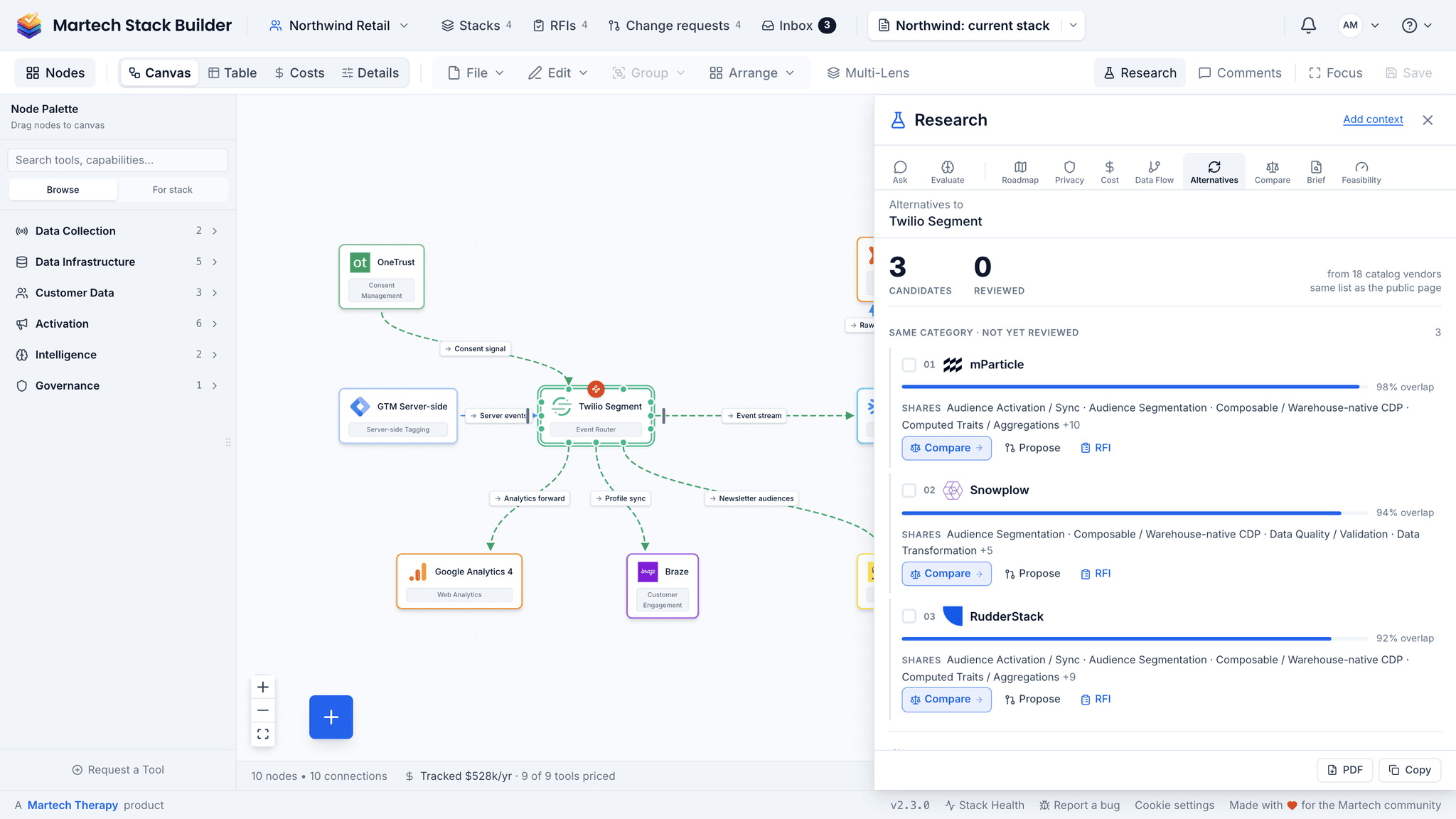
Alternatives & Recommendations
Click any vendor in your stack and open Alternatives. The shortlist is ranked from stored vendor-pair verdicts and capability overlap, so the model cannot invent or re-rank candidates. The AI then explains how each one would fit the rest of your stack.
- Shortlist ranked from stored vendor-pair verdicts
- Fit notes written against your stack
- Category-matched alternatives
- Integration compatibility considered
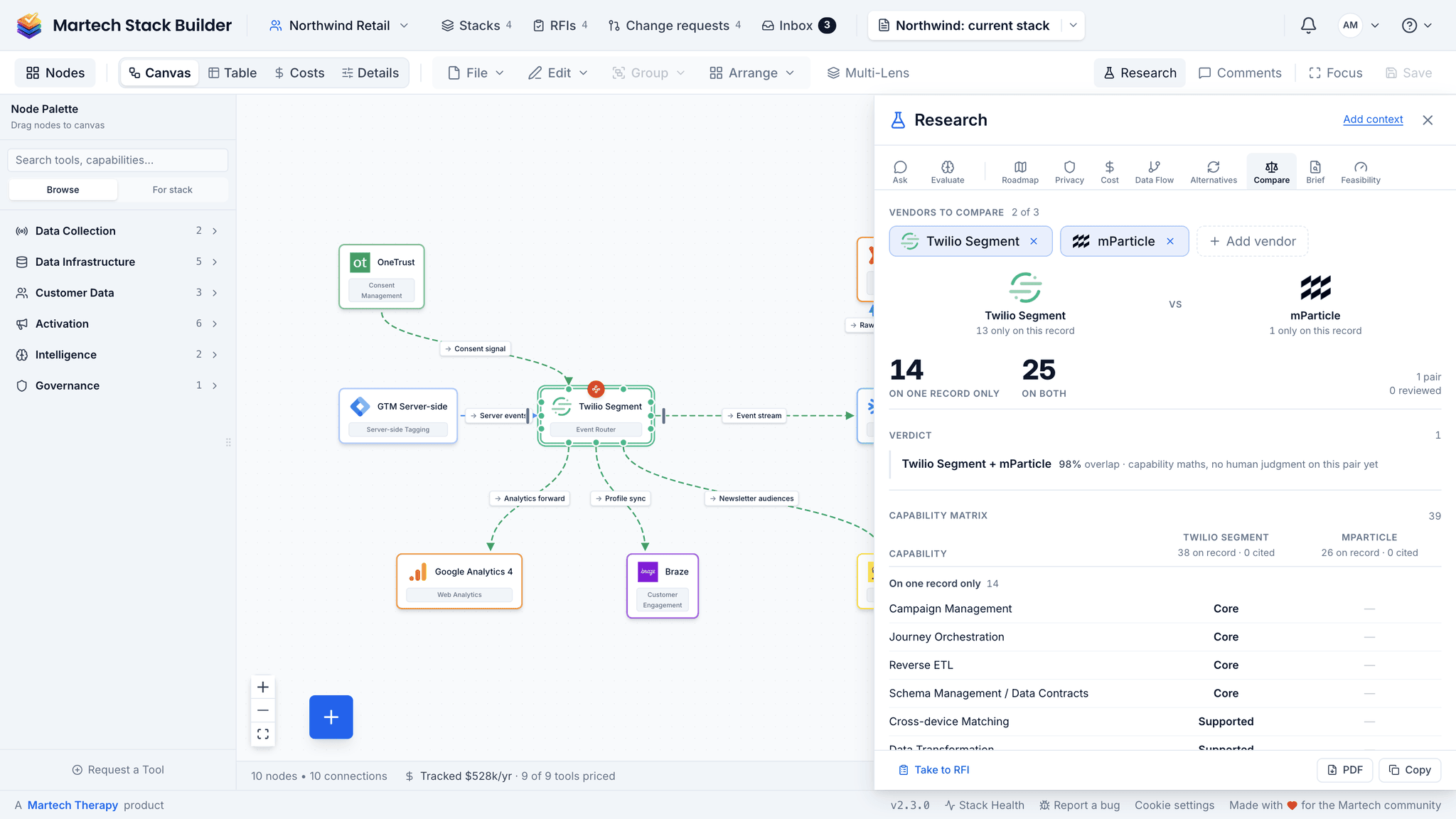
Side-by-Side Vendor Comparison
Put two vendors next to each other (three on paid plans): a capability matrix, the catalog verdict on the pair, verified integrations and published pricing. Capability ratings come from our evidence base of over 6,800 vendor-capability ratings across 340+ vendors, 94% of them with a source link. The AI summarizes what matters for your stack; it does not pick a winner.
- Capability matrix with cited evidence
- Catalog verdict on the pair
- Verified integrations and pricing
- No invented scores or winners
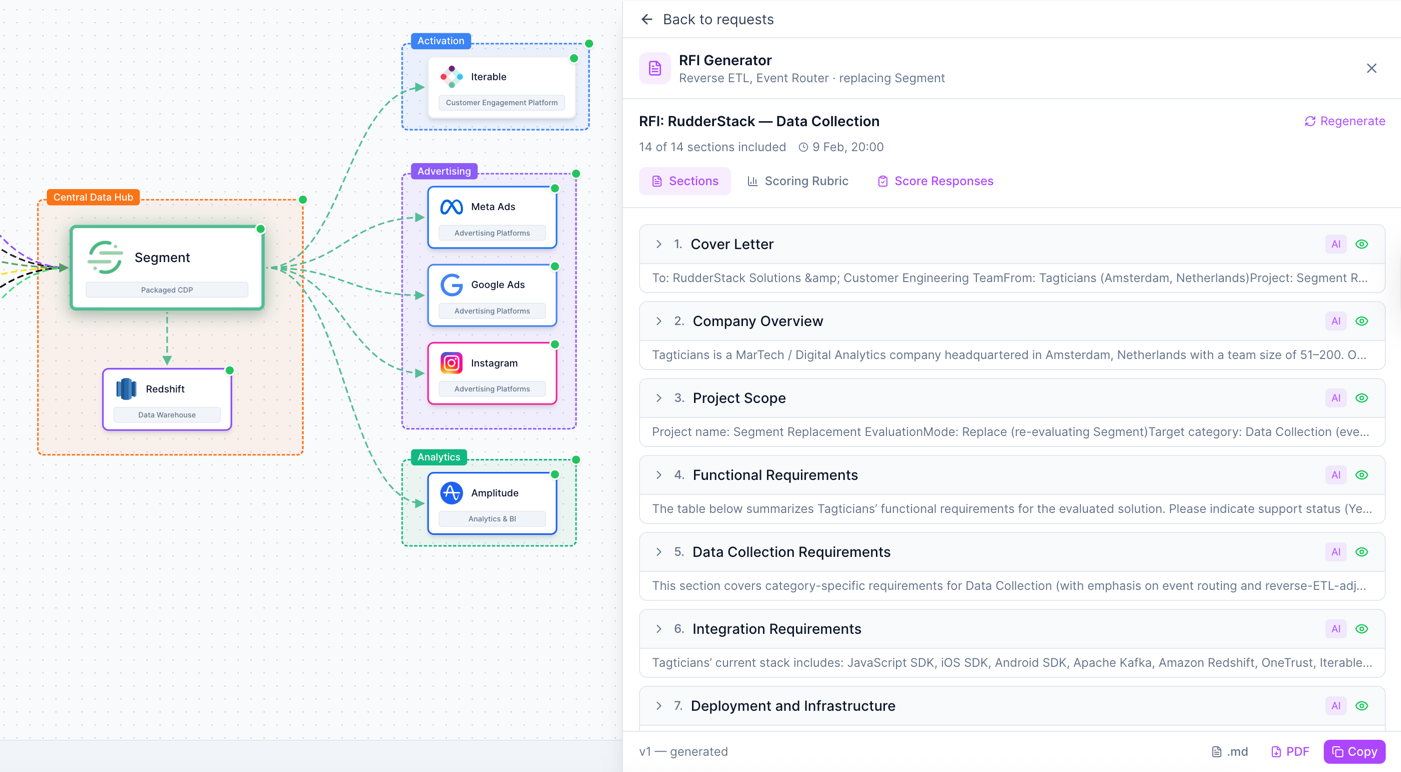
RFIs from one sentence
Describe what you are buying in a sentence and confirm one page: capabilities from the catalog, a vendor shortlist, and the rest filled from your stack. Stack Builder writes the Request for Information. Includes weighted scoring rubric, evaluation criteria, and vendor comparison framework. Export as PDF or DOCX, or copy it as Markdown.
- Describe the need, confirm one page
- AI-generated evaluation document
- Weighted scoring rubric
- Export to PDF, DOCX or Markdown
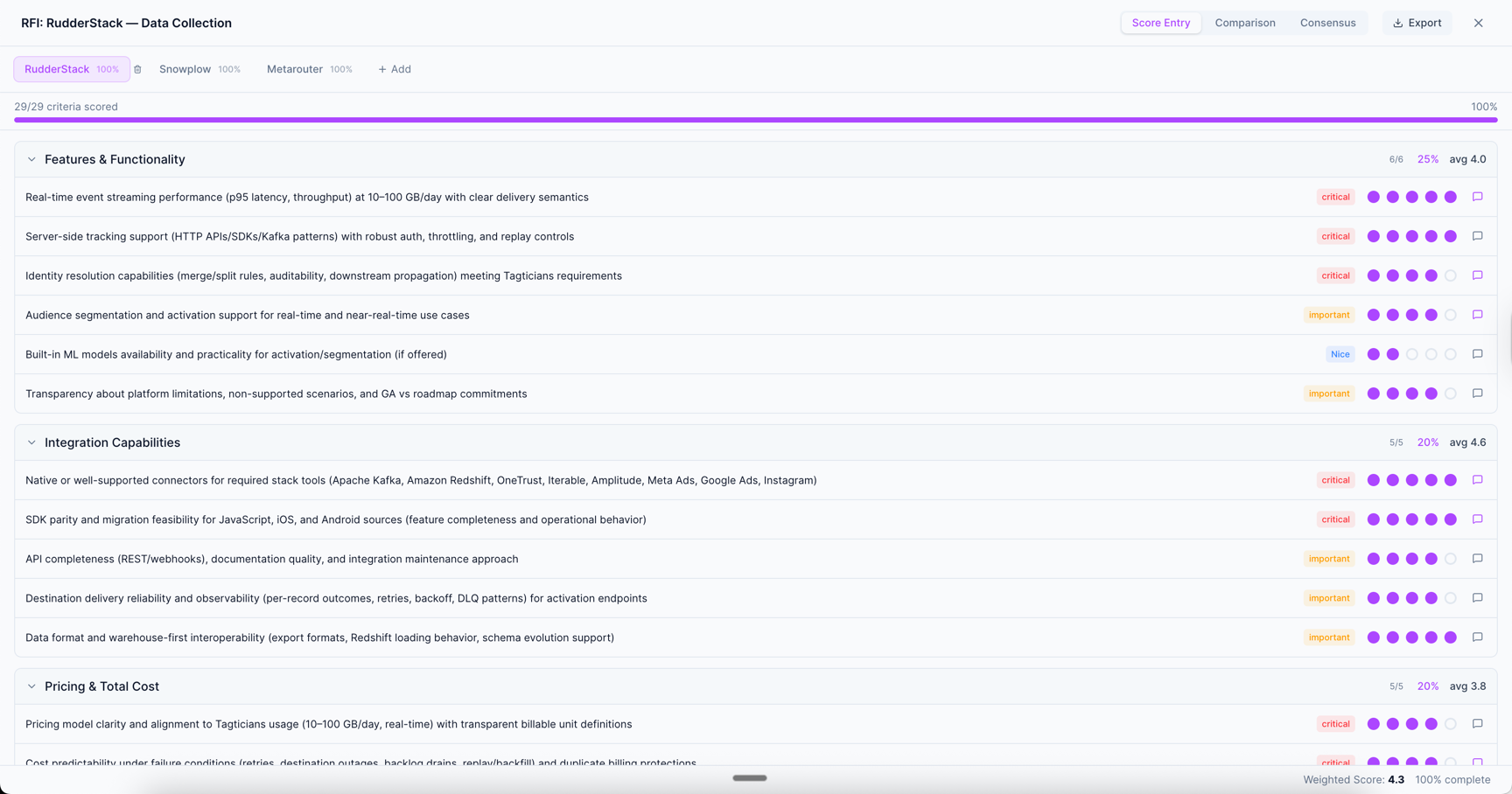
Vendor Scoring & Comparison
Score vendor responses criterion by criterion. Compare vendors side by side in a visual matrix. Build team consensus with multi-reviewer support and disagreement highlighting.
- Score vendors against your criteria
- Side-by-side comparison matrix
- Multi-reviewer consensus building
- Export as CSV, Markdown, or PNG
New — External Approvals
Get sign-off from people who don’t have an account
Procurement, legal, finance — they don’t want a login. Add them to a change request by email and they get a personal link to a page with just that request on it, where they approve, request changes or abstain. Their vote is recorded with their name, email, note and time. Part of change requests on Team, Agency and Enterprise.
Sign-off by personal link
No account, no shared password. One link per approver, which you can revoke or let expire.
Focused decision page
Just the change request: what is changing and why, and Approve, Request changes and Abstain. They can change their vote while the request is open.
Audit-grade record
The vote is recorded on the change request with the approver’s name, email, note and time.
Or — want it done for you?
Vendor evaluation, run by a martech architect
Matthew Niederberger — 20+ years in Martech architecture, founder of Martech Stack Builder. We design the RFI, score the vendors against your stack context, and recommend a shortlist with a defensible rationale. No vendor referral fees, no kickback partnerships — the recommendations stay honest.
What you get
- ✓ RFI design + scoring rubric
- ✓ Vendor shortlist with rationale
- ✓ Stack-context fit analysis
- ✓ Integration pattern recommendations
- ✓ Independent — no vendor commissions
The method
Evaluate a vendor by hand
Most vendor evaluations are decided before the scoring starts, then justified with a matrix. This procedure is designed to make that harder. Two to three weeks, most of it waiting on vendors.
-
Write the requirements before you see a demo
Requirements written after a demo describe that product. Write them from the job to be done, and get them agreed by whoever will use the thing daily.
-
Split must-have from nice-to-have, and cap the must-haves
If everything is a must-have you have written a wish list. Cap it — around ten. The cap forces the trade-off conversation into the room instead of into the decision.
-
Score each vendor against the requirements, not against each other
One vendor, one pass, before you look at the next. Comparative scoring drifts toward whoever demoed most recently.
-
Ask every vendor the same integration question
Name the two systems it must exchange data with, and ask exactly how, at what frequency, and who maintains it. Answers diverge sharply here, and this is where implementation cost hides.
-
Score total cost over three years, including the exit
Licence, implementation, the internal headcount to run it, and what leaving costs. The cheapest year-one option is frequently the most expensive three-year one.
CDP selection, three vendors, eleven must-have requirements.
| Vendor A — must-haves met | 10 / 11 |
|---|---|
| Vendor B — must-haves met | 11 / 11 |
| Vendor C — must-haves met | 8 / 11 |
| Vendor B, 3-year total | $612,000 |
| Vendor A, 3-year total | $374,000 |
| Vendor B implementation | 9 months |
Reading it: Vendor B wins the matrix and loses the decision. The one requirement A misses is worth naming out loud — if the team can live with it, A delivers two quarters sooner for $238,000 less.
The shortcut: The RFI builder sends the same requirement set to every vendor and keeps the responses side by side, so step 3 stays honest.
Frequently Asked Questions
How is this different from G2 or Gartner?
What does a generated RFI include?
Can my team collaborate on vendor scoring?
How many vendors can I compare?
Does the AI recommend specific vendors?
Are RFIs included in the free plan?
Related Solutions
Martech Stack Evaluation
Zoom out from single vendors: grade the whole stack on duplicated capability and the spend attached to it.
Learn moreRFI Builder
Generate professional vendor evaluation documents with AI.
Learn moreContract Management
Upload and query vendor contracts with AI extraction and citations.
Learn moreStart evaluating vendors in context
See how vendors fit your architecture before making decisions. Alternatives, comparison, RFI generation, and team scoring built in.
No credit card required. Free plan available.