 Event Watcher × Stack Builder
 Scan Any Site. Build a Stack Diagram in Three Clicks.
Start building your Martech stack easier than before by using Rune Andersen’s Event Watcher Chrome extension. Scan what tracking scripts and pixels are on the site, export the data, and import it here. Getting started is as easy as 1, 2, 3. Thanks to Rune for adding this feature to his extension.
Free · Made by Rune Andersen
As easy as 1, 2, 3
From "I wonder what they’re running" to a working stack diagram in under a minute.
Install Event Watcher
Free Chrome extension from the Web Store. Opens as a tab in DevTools; no account needed.
Install from Chrome Web Store →Scan + Export
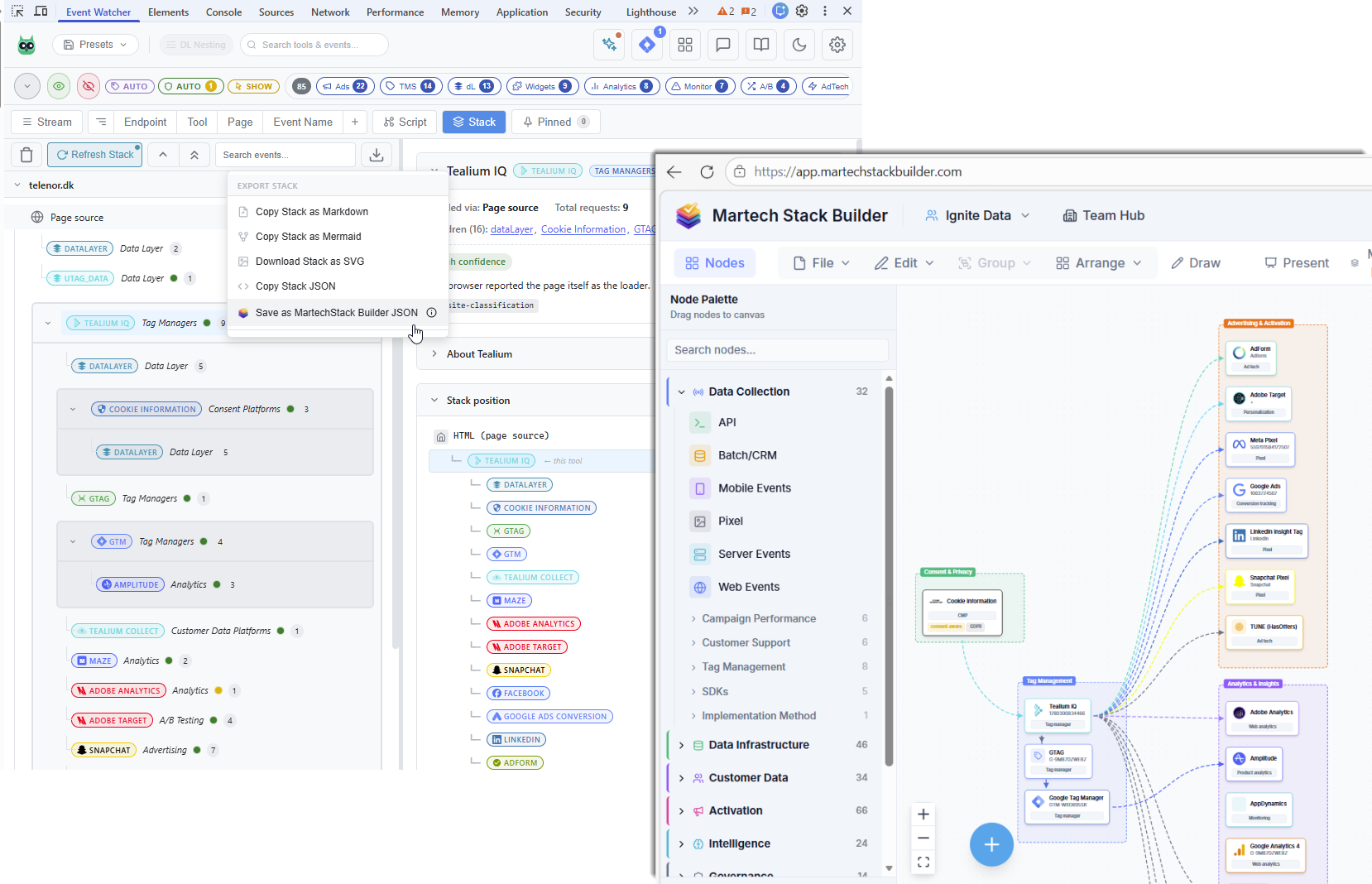
Visit any site, open DevTools → Event Watcher. The extension classifies 600+ platforms as the page loads. Click Save as MartechStack Builder JSON.
Tag managers, pixels, analytics, CDPs, CMPs, session replay — all detected from real network signals.
Import into Stack Builder
In Stack Builder: File → Import from JSON. Pick the file and the stack diagram appears on the canvas, ready to edit and save.
Open Stack Builder →600+ platforms recognized
Event Watcher sorts what it detects into categories. Some examples, as listed by Event Watcher:
Tag Managers
GTM, Tealium iQ, Adobe Launch, Segment, Rudderstack
Analytics
GA4, Adobe Analytics, Amplitude, Mixpanel, Heap
Advertising
Meta, LinkedIn, TikTok, Google Ads, Snapchat, Pinterest
CDPs
Segment, mParticle, Tealium, RudderStack, Hightouch
Consent (CMP)
OneTrust, Cookiebot, Didomi, Usercentrics, Sourcepoint
Session Replay
FullStory, Hotjar, ContentSquare, Clarity, LogRocket
A/B Testing
Optimizely, VWO, Dynamic Yield, Adobe Target
Server-side / SDKs
Stape, Addingwell, custom collectors, server containers
Event Watcher’s platform list grows with each release. See the full list at eventwatcher.dev.
Three ways teams use this combo
For consultants
Pre-kickoff client audits
Walk into the first meeting with the client’s front-end stack already on the canvas. Scan their site, import, then run the Evaluate tab for a first grade.
For in-house teams
Reality-check the spreadsheet
Compare what’s actually firing on your production site against what your "tools list" says. Find the rogue pixel nobody owns.
For competitive research
Map a competitor's stack
Scan a competitor’s site and see what their browser-side stack runs, laid out as an architecture diagram you can annotate.
Made by Rune Andersen
Rune is a Copenhagen-based developer building tools for Martech and analytics debugging. Event Watcher is free and actively maintained. Rune built the Save as MartechStack Builder JSON export into Event Watcher, and we’re grateful for the partnership.
Frequently Asked Questions
What is Event Watcher?
Does it cost anything?
What gets imported into my stack diagram?
How accurate is the detection?
Do I need a Stack Builder account to import?
Will Event Watcher see private data?
Can I use this on client sites or just my own?
Scan, export, import — in under a minute
Free Chrome extension plus a free Stack Builder account: a quick path from a URL to a working Martech architecture diagram.
No credit card required. Free plan available.