Your Martech Contracts, In Context
Upload order forms, SLAs, DPAs, and MSAs. AI extracts key terms and links them to your stack diagram. Ask questions in natural language — get answers with exact clause citations.
Your contracts are scattered
When was the last time you could instantly answer a question about a vendor contract?
Finding the right contract in email or shared drives
Checking renewal dates across 10+ vendor contracts
Verifying SLA terms when a vendor has an outage
Answering compliance questions about data processing
With Contract Management
Instant answers
From PDF to knowledge base in minutes
Four steps to make your contracts searchable, linked, and actionable.
Upload
Drop your PDF or DOCX contracts into the Agreements panel. Order forms, SLAs, DPAs, MSAs — the AI handles them all.
Extract
AI reads every page and extracts structured data: pricing, dates, SLA terms, compliance clauses. Review each field with its confidence rating before confirming.
Ask
Ask about your contracts in plain English, in the app or in Slack. Answers come with exact clause citations.
Act
Renewal dates show on each tool, and renewal alerts go out by email, in the app and in Slack. Compliance fields fill the Edit Table. Annual values feed Stack Costs.
Built for the complexity of real contracts
Not a simple document store — a connected intelligence layer for your vendor relationships.
Smart Contract Extraction
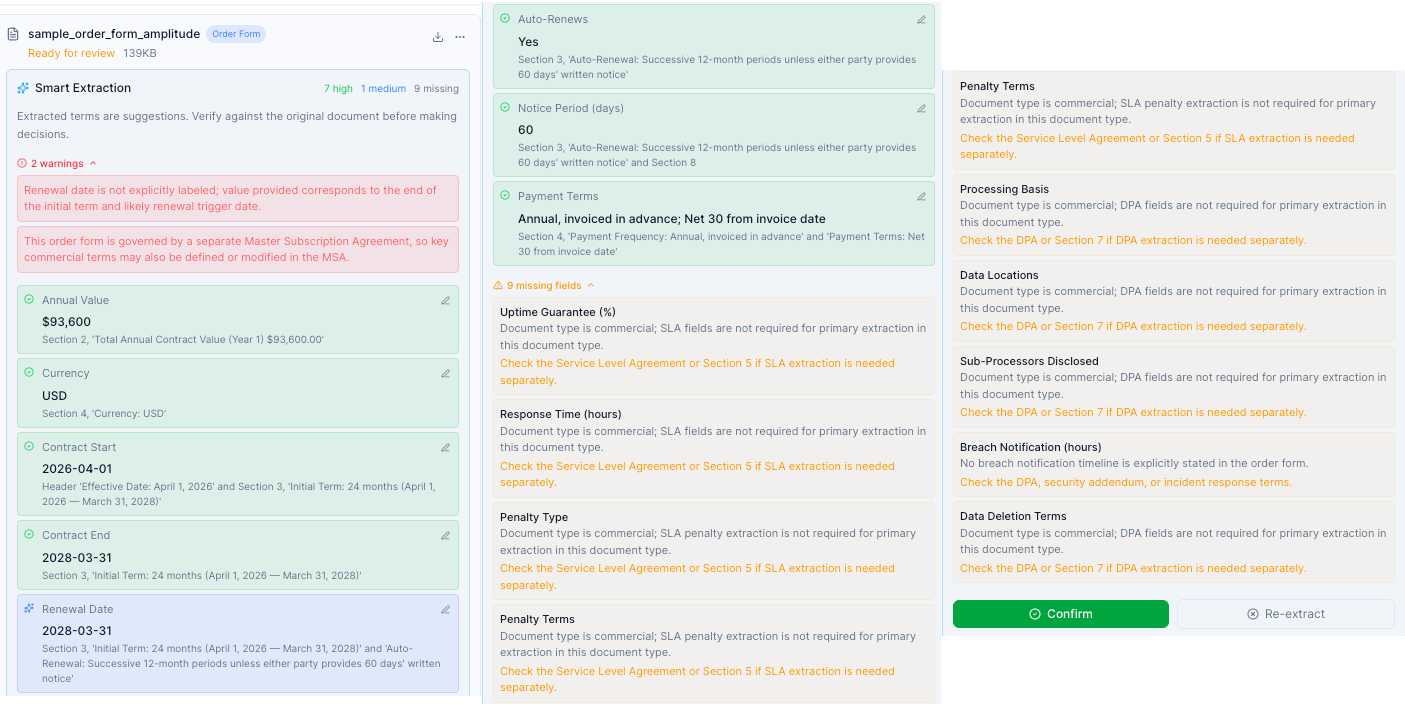
Upload any vendor contract and AI extracts the data that matters — pricing, renewal dates, SLA terms, DPA obligations, termination clauses. Each field comes with a confidence rating and the quote it came from. Review, correct, or re-run the extraction before it becomes part of your knowledge base.
- PDF & DOCX support (multi-page)
- Up to 35 fields across 6 agreement types
- Confidence rating and source quote per field
- Human-in-the-loop: review before accepting
Ask
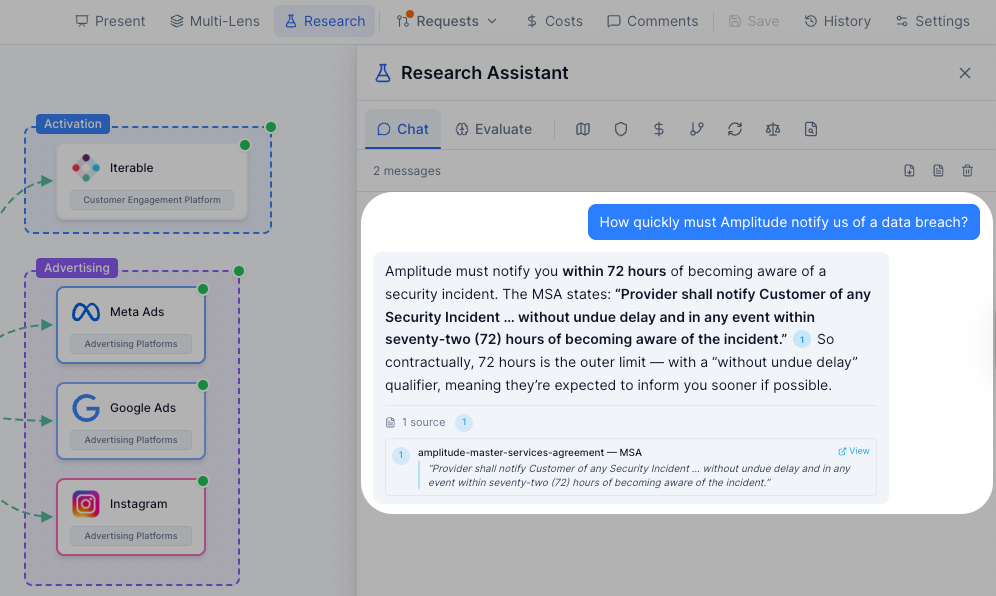
Ask questions about your stack and its contracts in plain English. "What’s the SLA response time for Segment?" comes back with the answer and the clause it came from, quoted. No more searching through PDFs. On Enterprise, once an owner or admin has agreed to AI processing of contracts, Ask reads the relevant passages from your agreements, and the same question works in Slack with /msb ask.
- Natural language Q&A across all contracts
- Inline numbered citation badges
- Verbatim quote extraction from source clauses
- Works across multiple documents simultaneously
Stack Integration
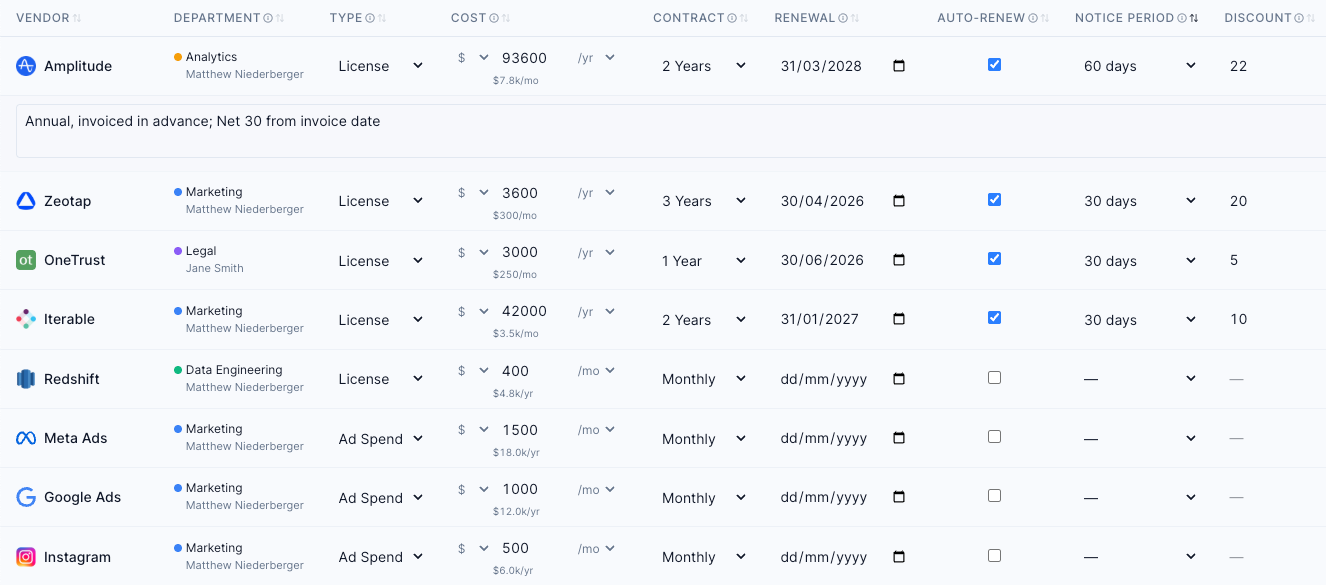
Contract metadata lives alongside your stack diagram. When you confirm an extraction, its terms are written onto the matching tool: annual value, renewal date and notice period, SLA and DPA fields. Hover a tool to see its renewal countdown and SLA; the Compliance columns in the Edit Table show SLA uptime, response time, DPA processing role and data locations.
- Contract data linked to vendor nodes
- Compliance columns in the Edit Table
- Renewal countdown in the tool hover card
- Annual value flows into Stack Costs
- Incidents checked against the SLA
Every agreement, by vendor
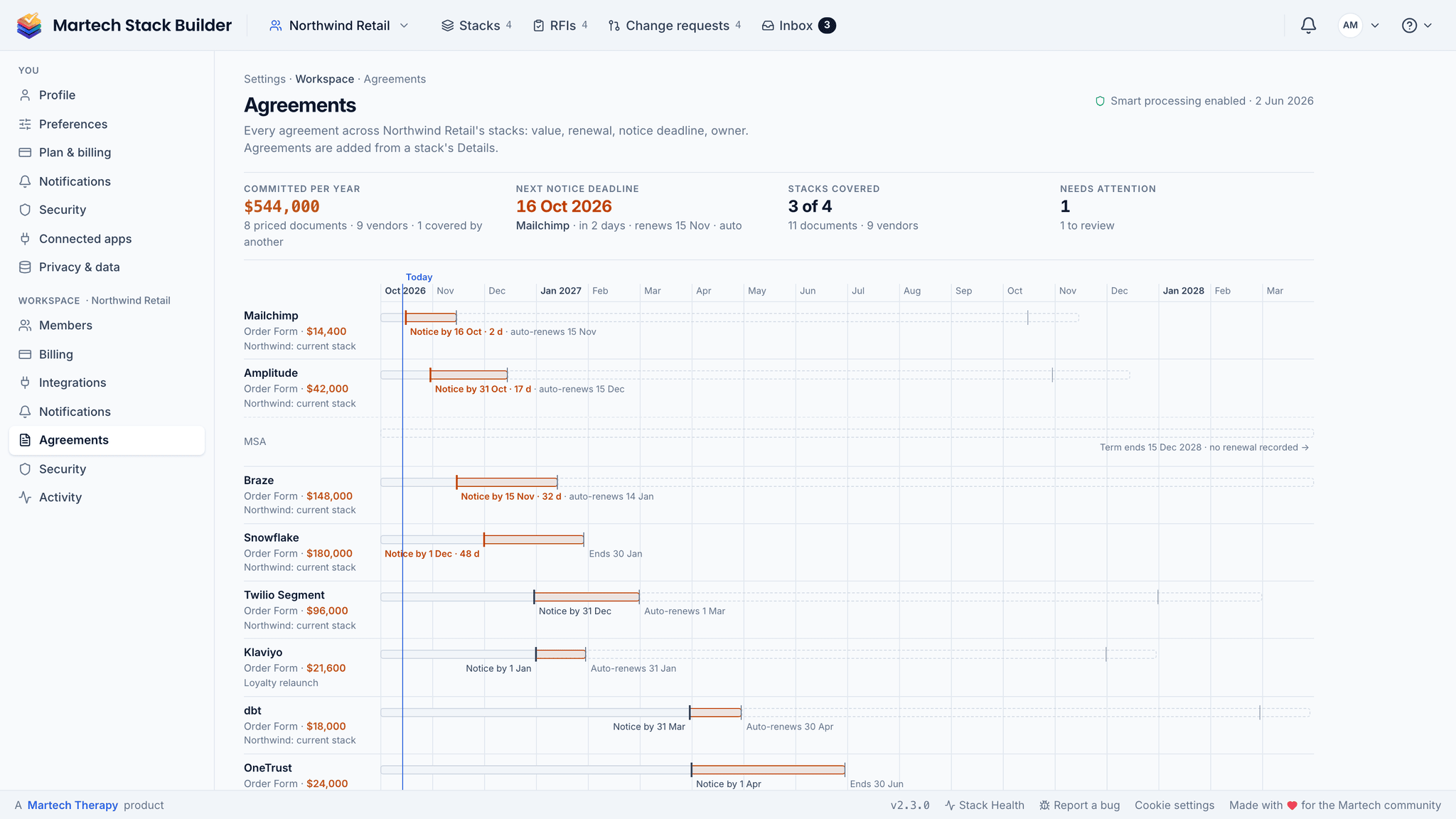
Open any stack’s Details and the Agreements section lists its contracts by vendor, each with its notice-by date and the days left. When one contract’s value is already covered by another (a master agreement, say), mark it as covered so the spend isn’t counted twice. Settings › Workspace › Agreements is the register for the whole workspace, every stack in one list.
- Agreements listed by vendor in the stack’s Details
- Notice-by date and days left on each one
- Covered-by, so a master agreement isn’t counted twice
- One register for the whole workspace
Your contracts deserve the same security as your code
Contract data is the most sensitive information in your vendor relationships. We treat it that way.
Per-team encryption
Every workspace has its own AES-256 key. Contract text, terms and clauses are encrypted with it before they are stored, and every decryption, including by our own staff, is written to your audit log.
Only your workspace
The database returns a workspace’s contracts, files and search passages to its current members only. Search cannot return another workspace’s contracts.
Audit trail
Every upload, change, deletion, extraction, download and AI answer that uses a contract is recorded, with who and when. Contract events are kept for 365 days, with CSV export on Enterprise.
AI only with your consent
No contract text goes to an AI provider until a workspace owner or admin agrees, and we check that on every request. Processing uses OpenAI. OpenAI does not train on it, and keeps it for up to 30 days for abuse monitoring before deleting it.
"This made my day. A genuinely useful tool for the Martech community."
Scott Brinker
Chief Martec · Creator of the Martech Landscape
Who this is for
Built for anyone who manages vendor relationships and needs answers fast.
Martech Managers
Stop losing track of renewal dates and SLA terms across 20+ vendor contracts. See everything in context alongside your stack diagram.
Procurement Teams
Build a searchable knowledge base of all vendor agreements. Compare terms across contracts. Answer vendor questions instantly during evaluations.
Compliance Officers
Instantly verify DPA data processing locations, SLA uptime guarantees, and MSA liability terms. Audit-ready answers with document citations.
New — Metadata Flows Into the Stack
Contract data lives in your diagram, not a folder
Once a contract is extracted, the key fields flow into the canvas automatically — renewal dates onto node tooltips, contract value into Stack Costs, SLA targets into AI evaluations. One source of truth.
Compliance columns
SLA uptime, response time, DPA processing role and data locations — visible per tool in the spreadsheet view, with the annual value alongside.
Real numbers, not estimates
Stack Costs reads the extracted annual value. Department breakdown and renewal calendar populate from the agreement.
Contract-aware
The evaluation checks each contracted SLA against what the tool’s connections need, and the other AI reports see the synced contract fields, not assumed market rates.
The method
Get contract control by hand
Most teams cannot answer "when does this renew and what did we agree" without opening a shared drive. This procedure builds the answer once. A day, then minutes per new contract.
-
Collect every contract in one place
Including the ones signed on a card and the ones inherited from an agency. If it bills you, it counts.
-
Extract six fields per contract
Renewal date, notice period, annual value, what happens on auto-renew, who signed, and what the exit terms are. Six fields is the minimum that makes a contract actionable.
-
Work out the real decision date
Renewal date minus notice period minus the time you need to evaluate an alternative. That date, not the renewal date, is what goes in the calendar — a 90-day notice period means the decision was due last quarter.
-
Sort by decision date and flag anything already past
Anything whose decision date has passed is auto-renewing whether you chose it or not. That list is your immediate work.
-
Put every decision date in a shared calendar with an owner
In a calendar other people can see. Contract knowledge held by one person is a single point of failure with a price tag.
Agency-inherited stack, 16 contracts, collected from four different drives.
| Contracts found | 16 |
|---|---|
| With 90-day notice periods | 7 |
| Decision date already passed | 4 |
| Auto-renewing this quarter | $83,000 |
| No identifiable internal signer | 3 |
Reading it: Four missed decision dates is $83,000 committed by inaction. The three contracts with no identifiable signer are the harder problem — nobody can cancel what nobody owns.
The shortcut: Smart Extraction pulls the key terms out of the document, and the renewal calendar subtracts the notice period for you, so step 3 starts from the right date.
The argument behind this
Negotiating the new martech economy
On where leverage actually sits in a vendor relationship.
Frequently Asked Questions
What file formats are supported?
How does the AI extraction work?
Is my contract data secure?
Can I ask questions about my contracts from Slack?
How much does it cost?
Who can see my uploaded contracts?
Related Solutions
Ask Your Contracts
AI Q&A over your uploaded contracts with verbatim clause citations.
Learn moreRFI Builder
Generate an RFI from your stack, send it to vendors and score the responses.
Learn moreMartech Governance
Establish structured change management with approval workflows and audit trails.
Learn moreYour contracts deserve better than email attachments
Upload your contracts and see AI extraction in action. Part of the Enterprise plan.
No credit card required. Free plan available.