Stack Costs
What your stack costs, and when you have to say something about it
Spend, notice-by dates and the plan for the next negotiation, next to the diagram they belong to.
Costs and the one-pager on Consultant and up. Renewal dates and reminders on every plan.
The renewal nobody decided
A tool gets bought for a project. The project ends, its champion moves on, and the contract renews anyway. Nobody’s careless. The notice period is just shorter than a busy team’s memory.
The last day to give notice sits in a PDF nobody has opened since signing. (When did you last open yours?)
So the costs and the dates go where the stack already lives.
What each tool costs
Switch any stack from Canvas to Costs. Every tool gets a row with its yearly cost, billing, seats, paying department, renewal date and contracted price increase. Totals are kept per currency and never converted, because a converted number is a guess with a decimal point.
- Tracked spend, off-the-books spend and seat utilisation
- What unused seats would give back at the next renewal
- Spend by department, one click to filter the table
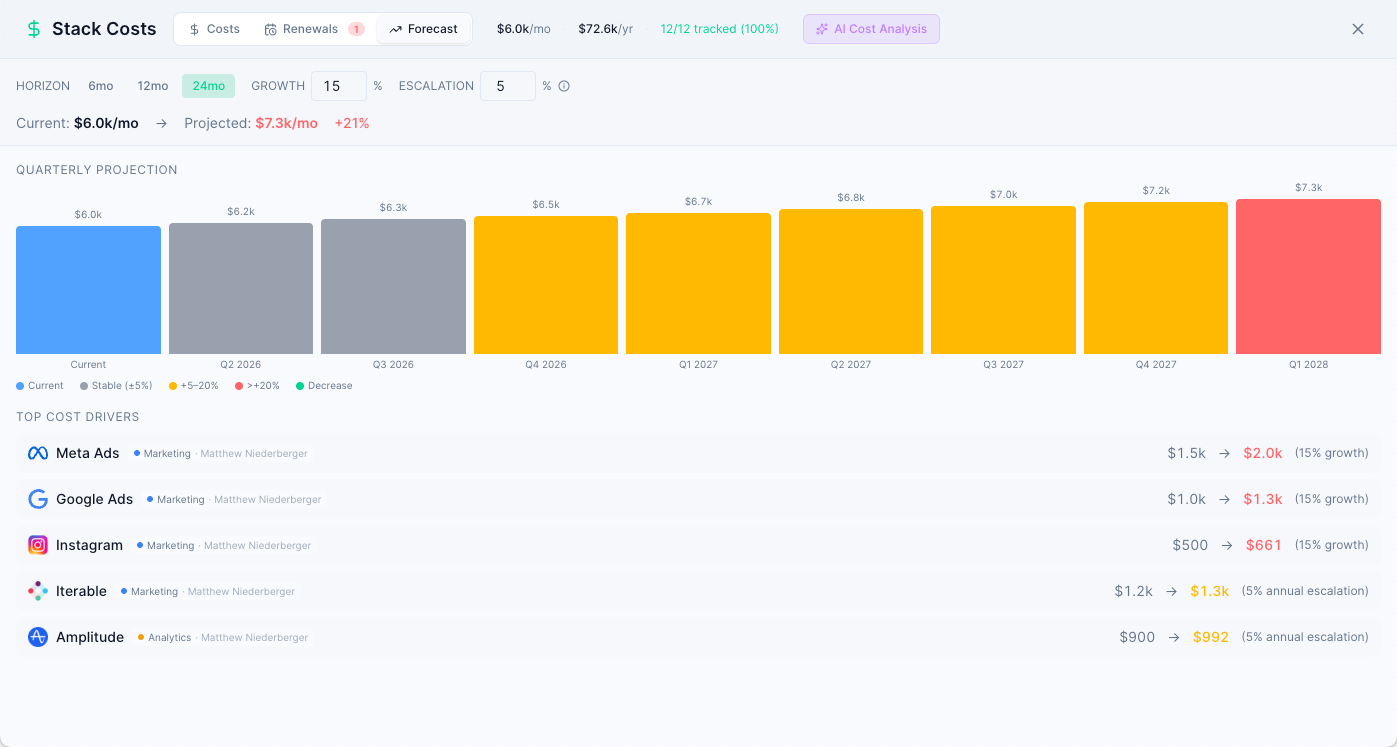
- A forecast of next year’s spend
One renewal calendar
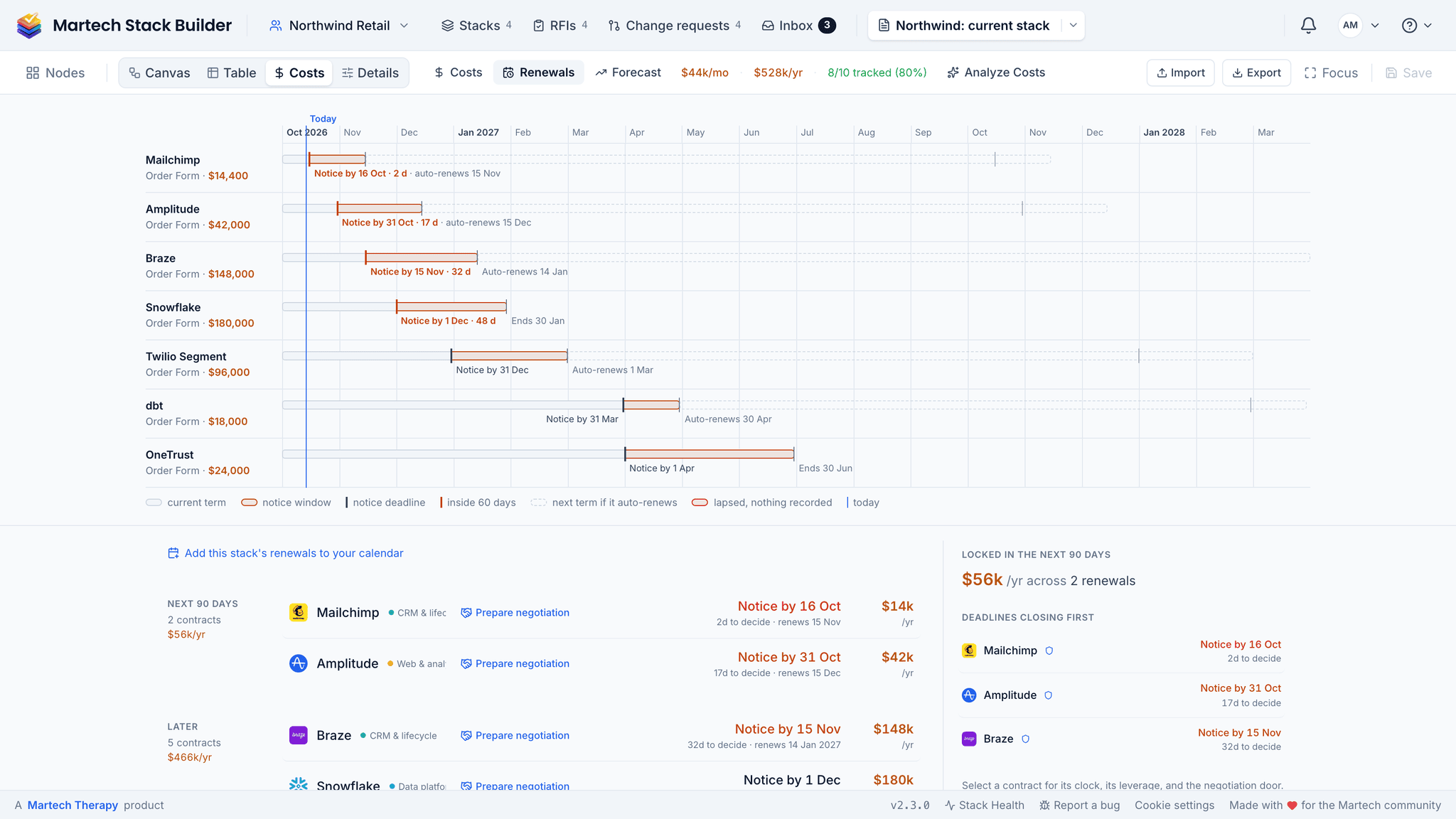
Every renewal sits on one 18-month timeline with its term, notice window and notice-by date. That’s the renewal date minus the notice period. Nothing clever. Contracts that renew on their own are marked, and below the timeline the same renewals are listed as overdue, next 30 days, next 90 days and later.
- Reminders when the notice window opens, seven days before notice-by, and once if it passes
- By email and in the app, by push on your phone, and in Slack on a team workspace, without the price
- Mark one renewed, fix a date, or mute it
- A calendar file for Outlook or Google Calendar
Bring your budget file
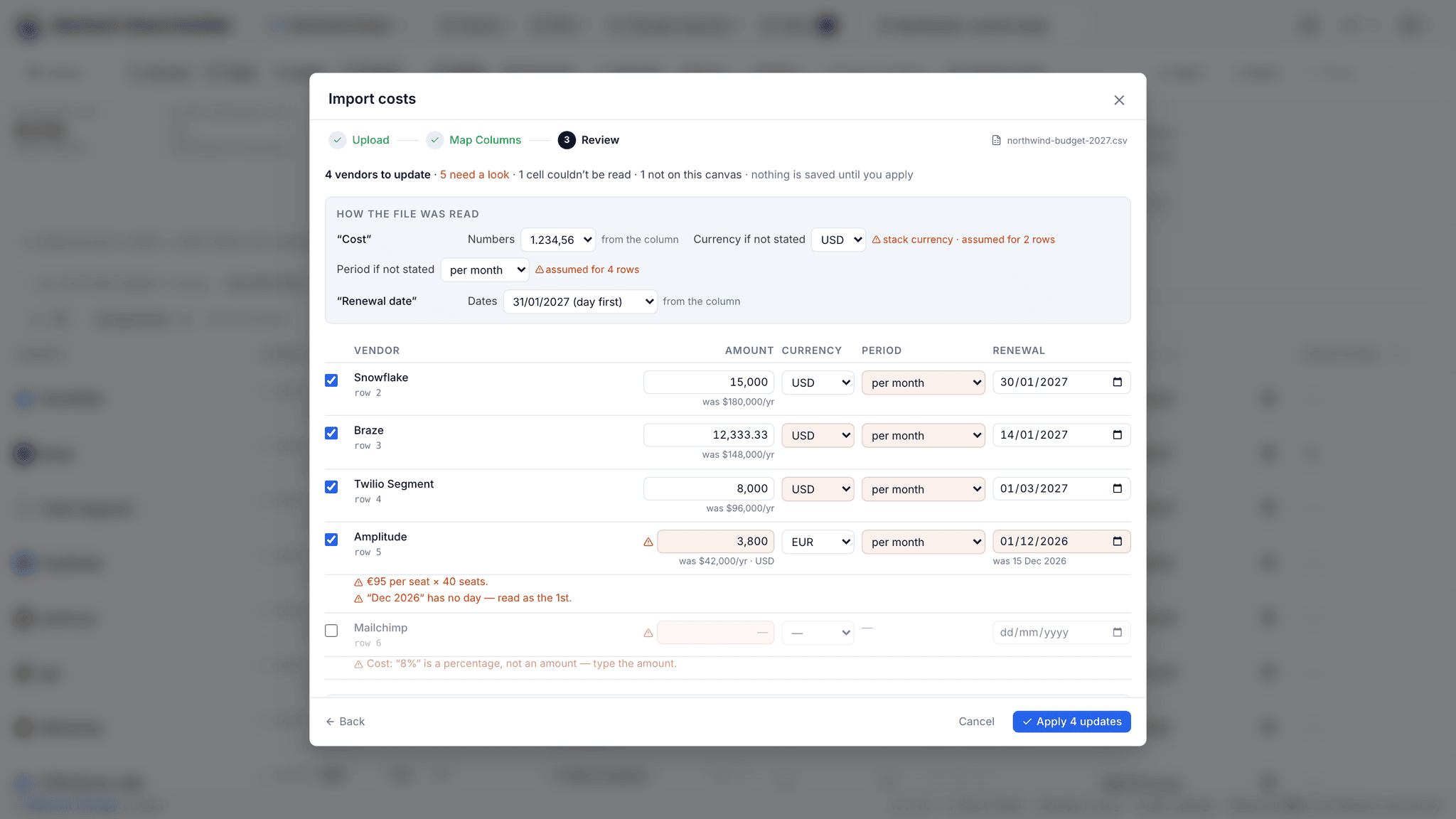
The costs are probably already in a spreadsheet finance sent you. Import it as CSV or Excel. Nothing is saved until you’ve reviewed what it read for each tool, with every assumption flagged, such as which currency a bare number is in.
- Reads 1.234,56 €, 1’234.56, USD 42,000, 42k, 3.5 mio and (1,200) as a credit
- Amounts per month, year or seat; dates day or month first, month names in nine languages
- From Excel, the number stored in the cell, not its formatting
Walk into the negotiation with a plan
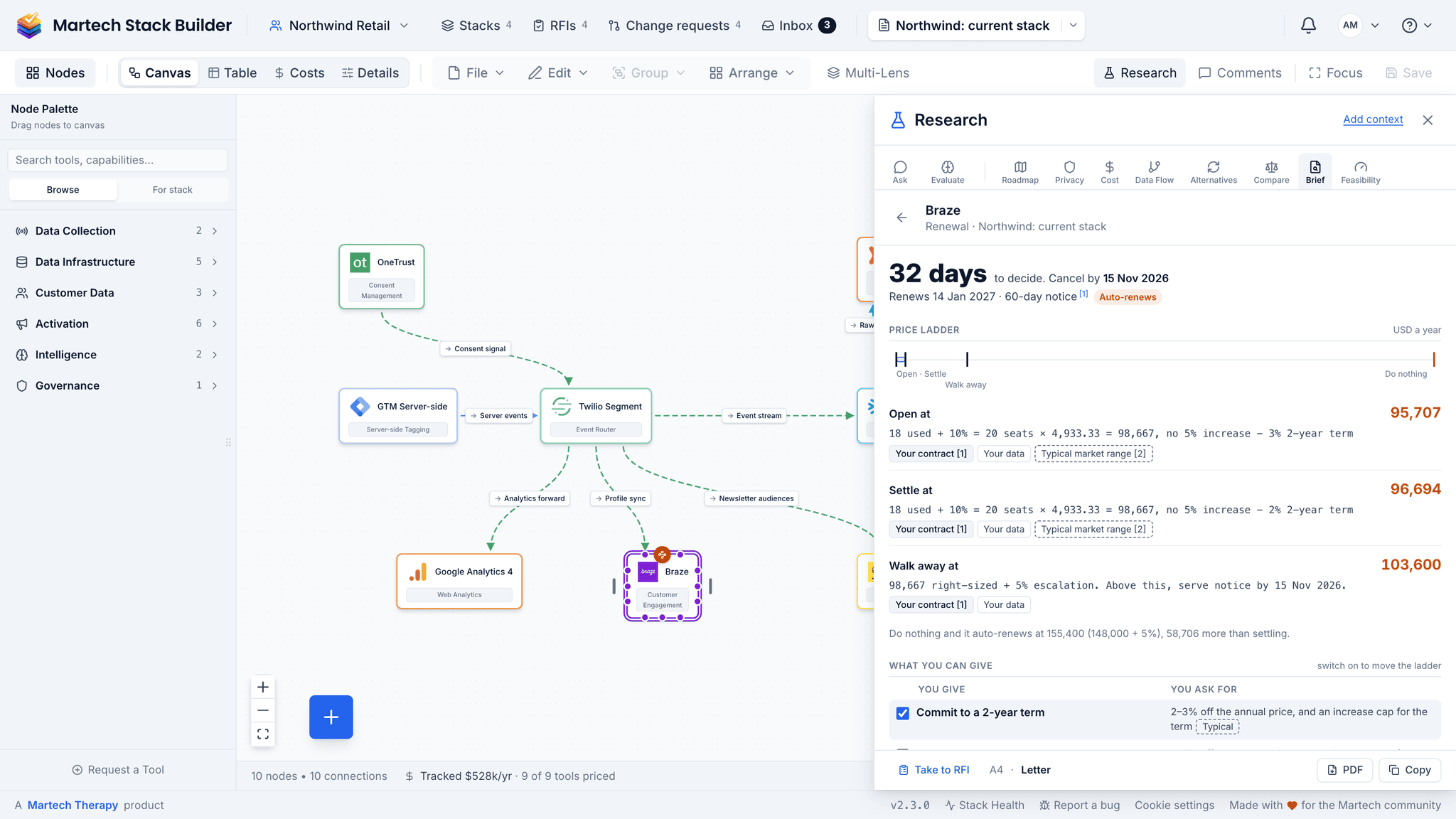
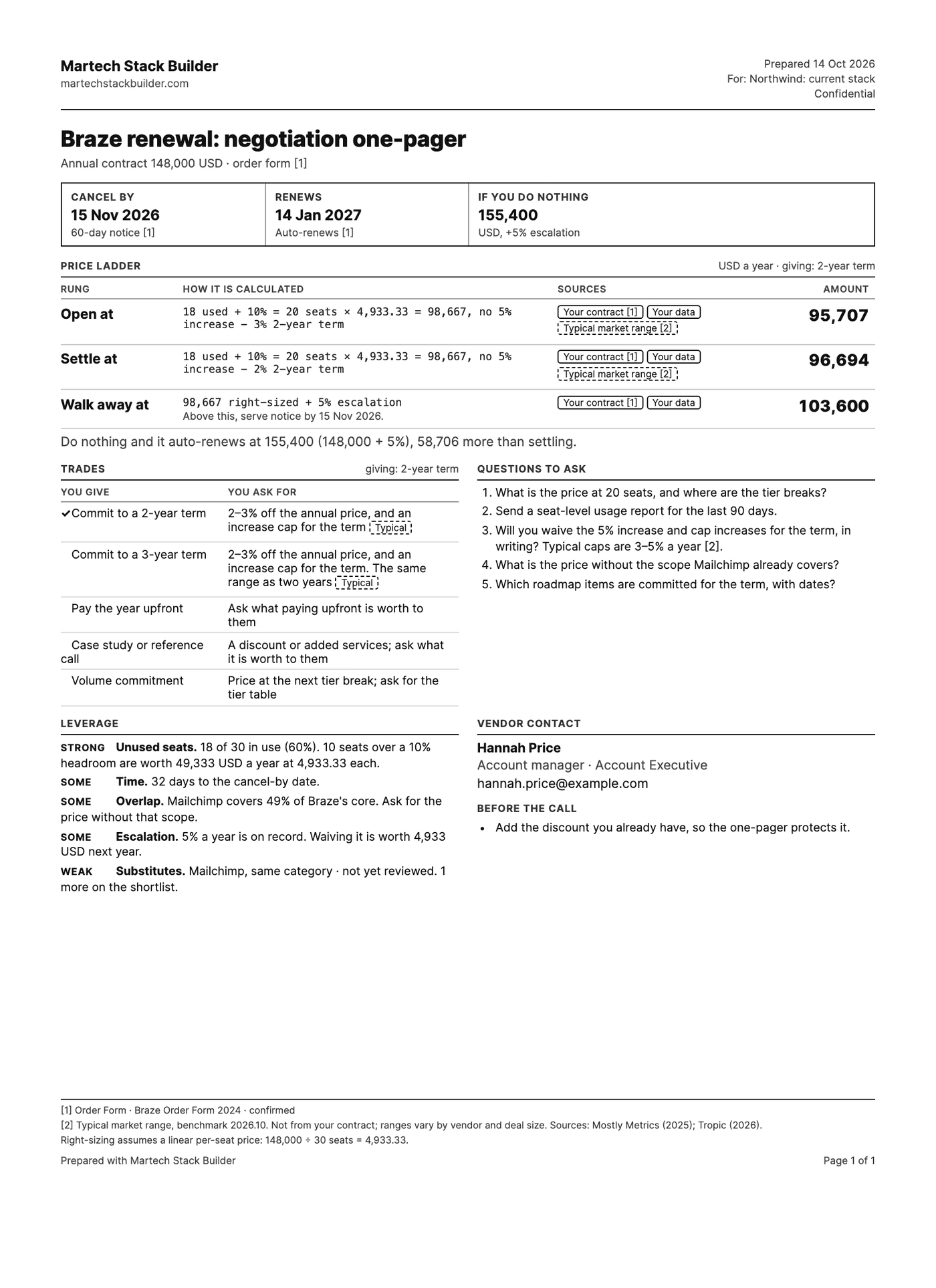
Every renewal row has a Prepare negotiation button. It builds a one-page plan: an opening ask, a settle point and a walk-away, each with its arithmetic and sources. The ladder is calculated, not generated. AI writes the talk track and can’t state a figure the calculation didn’t give it.
- Longer terms and increase caps priced in; prepaying, volume and case studies as questions
- Seats sized to real use, plus 10% headroom
- Key dates, your vendor contact and the vendor’s fiscal year end
- Print it, copy it, email it to yourself, or open it on your phone
The method
Prepare a renewal negotiation by hand
Most renewals are negotiated down from the vendor’s number. This gives you your own number first, with the working beside it. About an hour per renewal.
-
Write down what you pay and what you use
Annual cost, billing, seats bought and seats used in the last 90 days. If nobody knows the seats used, that is your first question for the vendor.
-
Work out the notice-by date
Renewal date minus the contract’s notice period. The negotiation has to finish before that date, not before the renewal.
-
Size the seats to real use
Seats used plus about 10% headroom, priced at today’s rate. The gap to what you pay now is where the conversation starts.
-
Build a three-rung price ladder
An opening ask, a settle point and a walk-away, each with its arithmetic. A number you cannot explain is one you will give up in the first call.
-
Decide what you can trade
A longer term or an increase cap can be priced, so put them on the ladder. Prepaying, volume or a case study cannot, so write them down as questions.
A marketing automation renewal: 120 seats at $800 each, 90-day notice period.
| Annual cost today | $96,000 |
|---|---|
| Seats used / bought | 74 / 120 |
| Right-sized seats (used + 10%) | 82 |
| Right-sized cost at today’s price | $65,600 |
| Recoverable before any discount | $30,400 |
Reading it: The opening ask starts from $65,600, not from a percentage off $96,000. A 15% discount on 120 seats still pays for 38 seats nobody uses.
The shortcut: The Costs view keeps seats, costs and notice-by dates in one list, and the negotiation one-pager builds the step 4 ladder with the working shown.
Frequently Asked Questions
Which plan includes Stack Costs?
Does it convert currencies?
Does the AI make up the numbers on the negotiation one-pager?
Can it sync with a Google Sheet?
How does it work with uploaded contracts?
Can I use it on my phone?
Related Solutions
Contract Management
Upload vendor contracts, extract the key terms, and see every agreement by vendor with its notice-by date.
Learn moreStack Consolidation
See which tools duplicate each other and what cutting one would save.
Learn moreOn your phone
Renewals by notice date and the negotiation one-pager, away from your desk.
Learn moreSee what your stack costs
Map the stack, add what each tool costs and when it renews, and plan the next negotiation on one page.
No credit card required. Free plan available.